Homes tell on themselves. A scorch mark on a power strip, a switch that crackles, a kitchen that feels dim no matter how many lamps you buy, a breaker that trips when the toaster and microwave dare to collaborate. These are the little confessions that your electrical system needs attention. The good news is that targeted upgrades to outlets, switches, and lighting solve most of the day‑to‑day pain points, and they set you up for bigger moves like EV charger installations, smart home device installation, or even solar panel installation when the time comes.
I’ve spent enough years crawling attics, tracing circuits, and fishing wire through plaster to know the difference between a quick win and a costly mistake. The details below come from jobs that went right, jobs that went sideways, and homeowners who wanted real answers, not a sales pitch. When a residential electrician does this work with care, you get a home that feels better, works safer, and costs less to run.
Why outlet upgrades punch above their weight
Most houses carry scars from technology that outpaced them. A 1950s bungalow gains a home office with three monitors and a laser printer. A 1990s kitchen inherits air fryers, espresso machines, and a high‑draw induction hotplate. The original wiring had other plans. You start to see warm cover plates, weak or loose receptacles that won’t grip a plug, and daisy‑chained power strips under desks.
The best fix often starts at the outlet. The humble receptacle, upgraded thoughtfully, can cure nuisance tripping, reduce fire risk, and cut clutter.
Take GFCI protection. Bathrooms, garages, kitchens, basements, outdoor outlets, and laundry areas should be on ground‑fault circuit interrupters. A GFCI compares current on the hot and neutral conductors and trips when as little as 4 to 6 milliamps go missing, a sign current is taking a path through you or water. It’s not optional in wet‑use locations. If your bathroom plug has a “test” and “reset” button, you’re partway there. If not, you’re gambling.
Anecdote from a small 1930s remodel: a single GFCI outlet placed correctly, feeding downstream standard receptacles, gave the whole bathroom run proper protection without replacing every device. We mapped the circuit, confirmed the line and load legs with a meter, and labeled the downstream receptacles as GFCI protected. Cost stayed modest, safety jumped dramatically.
Arc‑fault protection is the quieter sibling. AFCI outlets or breakers sense the erratic signature of an arcing fault inside a cord, loose connection, or damaged cable hidden behind a wall. Newer codes push AFCI into most living spaces. The difference you feel is fewer mysteries: that click‑pop behind a bedroom dresser, the faint burning smell that nobody can source. You can address many of these risks by replacing old two‑prong or worn three‑prong receptacles with AFCI receptacles on branch circuits, or by upgrading the breaker panel to combination AFCI breakers. A competent residential electrician can evaluate which path makes sense for your layout and budget.
Then there’s the matter of capacity. The outlet itself is only a mouth at the end of a pipe. If that mouth feeds from a 15‑amp circuit and you plug a space heater into a strip that also powers a treadmill and a dehumidifier, the breaker will protest. Sometimes the cure is as simple as spreading loads across circuits. Other times, the right move is adding a dedicated 20‑amp circuit with 12‑gauge wiring to a particular area, like a workshop wall or home office. I have installed more dedicated office circuits than I can count since remote work became a normal week. The cost is usually moderate compared to a panel upgrade, but the payoff is huge: stability, less heat at the receptacles, and the end of extension cord spaghetti.
Smart outlets earn their keep in specific cases. If you manage vacation rentals or have teens who never turn the gaming console off, a smart plug or in‑wall smart receptacle tied to a hub gives you scheduling, energy reporting, and control when you are not home. I lean on reputable brands with solid UL listings and good support. The wrong smart device wastes time with flaky connections and phantom “offline” errors, and that turns smart home device installation into a recurring chore.
Finally, do not ignore grounding. Older homes sometimes have two‑prong receptacles and no equipment ground. Slapping in a three‑prong adapter without addressing the ground is not an upgrade, it is theater. The proper fix is either running a new grounded circuit, retrofitting a ground, or installing GFCI protection and labeling the outlet as “No Equipment Ground.” A qualified residential electrician will test your grounding electrode system as part of the visit. That small test can prevent an unpleasant surprise later, like sensitive electronics failing after a nearby surge.
Switches that do more than click
Switches seem simple until they are not. A dimmer that hums or flickers LED lights is not broken, it is mismatched. Many older dimmers expect incandescent loads and try to throttle current in a way that leaves modern LED drivers stuttering. This is why a kitchen fills with strobe‑like flicker when someone slides a cheap dimmer to 10 percent. The fix is to pair LED‑rated dimmers with LED fixtures that name dimmable compatibility right on the box.
Three‑way and four‑way switching is another place where small changes transform daily life. A stairway switch on both floors, a long hallway with two control points, a garage entry paired with a kitchen exit. I often find one side of a three‑way switch replaced by a previous owner who didn’t understand the traveler wires, causing a setup where both switches have to be “up” to work. Wire continuity testing clears that up. If the cable paths cooperate, smart switches with wireless companions avoid fishing new travelers through finished walls. You install a powered master switch at one location, then a battery operated remote that pairs over a low‑energy protocol at the other. No new holes, no drywall patches.
A favorite small upgrade for bedrooms is the combo switch that adds a quiet, timer‑controlled exhaust fan. Bathrooms need it more than you think. Manual fans get left off too soon, moisture stays, and you get peeling paint or mildew. A 20, 40, 60 minute push‑button timer solves that. It costs little, installs in place of a standard single‑pole, and protects your finishes.
For households heading toward more automation, a thoughtful mix of smart switches and smart bulbs is the trick. Put smart switches on high‑use circuits like kitchen cans or exterior lights. Leave smart bulbs for decorative lamps where individual color and dim levels matter. In a dozen projects, that hybrid approach lowered headaches, kept reliable physical control for guests, and made voice or app control feel like a bonus, not a requirement.
Lighting done right changes how a home feels
I have walked into homes with pricey furniture, then watched everything look dull because the light was wrong. Upgrading fixtures is not just about lumens. It is color temperature, distribution, glare control, and switching that matches how people live.
Start with color temperature. Warm white around 2700 to 3000 Kelvin flatters skin tones and wood. Cool white above 3500 K starts to feel clinical, great for a garage or laundry, not wonderful for a living room. In kitchens, I like 3000 to 3500 K paired with high color rendering (CRI 90 or better) so fresh herbs and produce look vibrant. The homeowner sees it every time they chop cilantro. That small spec, CRI, is buried on the box but worth seeking.
Distribution comes next. Recessed downlights punch light straight down. They are fantastic over counters and task areas, a little soulless if that is all you have. Add layered light: a pendant over the island, under‑cabinet strips tucked out of sight, and a few aimable accent spots for artwork. Under‑cabinet lighting deserves a special nod. Hardwired LED strips, not puck lights, produce even illumination without hot spots. Wired to a dedicated low‑profile switch, they serve as midnight path lighting and make prep work pleasant.
Exterior lighting benefits from restraint and control. Bright security floods that glare in all directions satisfy the hardware store aisle. Your neighbors dislike them. Better is a combination of low‑glare wall packs near doors, step lights on stairs, and motion‑activated floods aimed at ground, not windows. Hook them to smart occupancy sensors and dusk‑to‑dawn controls so they only run when needed. A recent job replaced six 150‑watt halogens with LED equivalents drawing around 25 watts each, tied to photocells. The nighttime electric bill dropped, and the raccoons got less attention.
When it comes to ceiling fans with integrated lights, choose models with replaceable LED modules or standard sockets. Fans with non‑serviceable boards tend to fail after a few years, leaving you with a dark, spinning paperweight. A little extra cost up front keeps you from calling a residential electrician for a full replacement because a proprietary light board died.
Smart lighting has a place, but if the app needs three taps just to turn on the living room, you will revert to wall switches. Keep the control plane simple. Smart thermostat installation taught the industry this lesson years ago: the best technology enhances old habits instead of replacing them. The same applies to lights.
Safety upgrades that quietly protect everything you love
Some upgrades you never notice, until they save you from an expensive week. Surge protection installation sits at the top of that list. A modern home contains thousands of dollars in electronics, plus LED drivers, smart switches, and appliances with sensitive boards. A whole‑home surge protective device, mounted at the service panel, clamps the bulk of voltage spikes that ride in from the utility or large loads cycling on and off. It does not replace point‑of‑use protectors for your computer or home theater, it complements them. I treat it like a seatbelt and an airbag. You want both.
Smoke detector installation remains a chronic oversight in remodels. If your detectors are yellowed, chirp at odd hours, or predate smartphones, upgrade them. A hardwired system with battery backup and interconnect will sound in every room when one unit trips. That interconnect gives you the precious minute you need when a fire starts in the garage and you are asleep upstairs. Consider adding a few heat detectors in areas prone to nuisance alarms, like attics and garages. They respond to rapid temperature rise instead of fumes from a parked car.
I also like to check the service equipment while I am there. Rust in the meter base, scorching on bus bars, brittle conductor insulation. Electrical maintenance services can be boring on paper, but they prevent outages and damage. A 30 minute panel inspection once a year catches loose lugs, especially after heavy heating or cooling seasons when large loads stress connections.
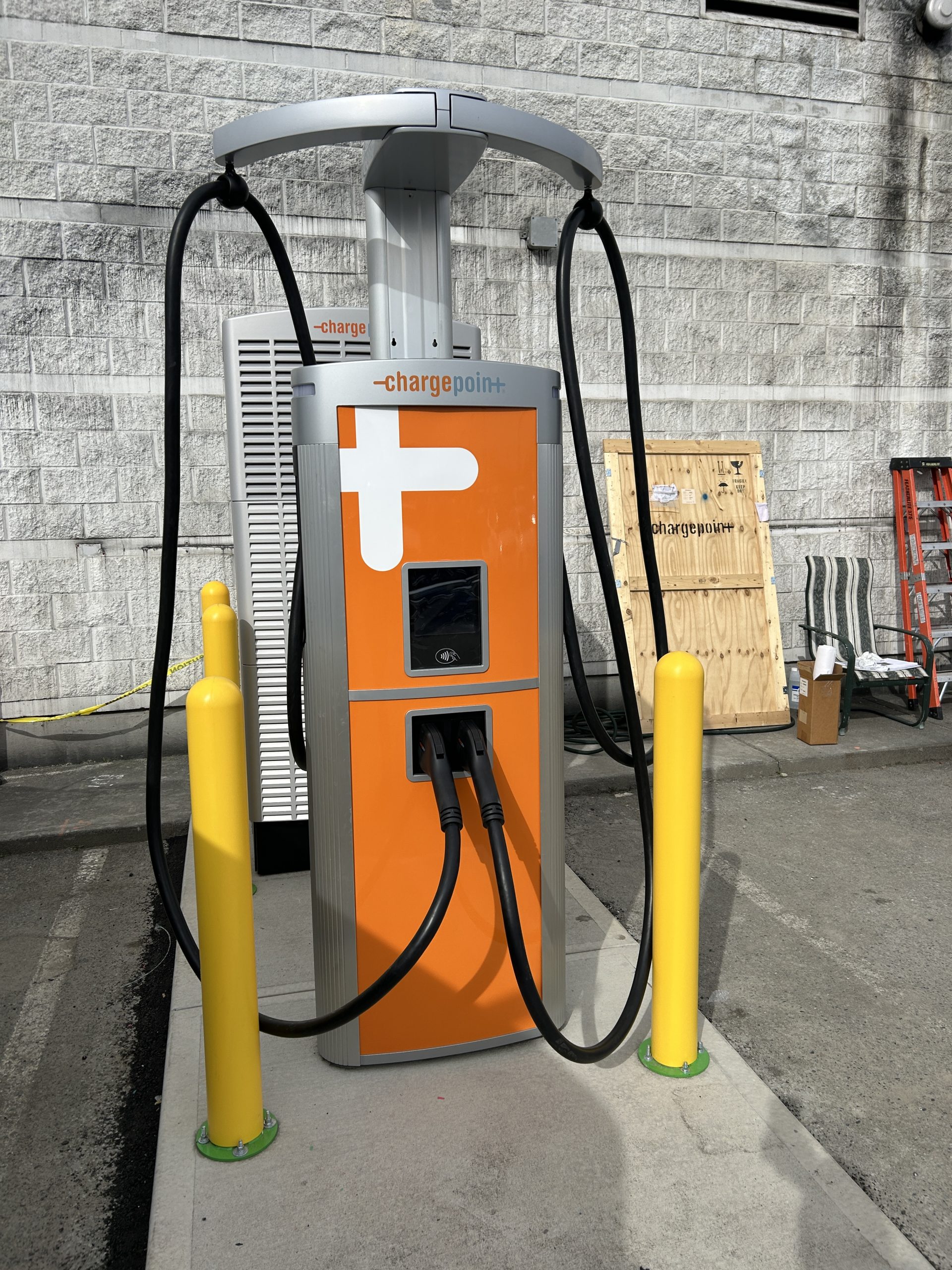
The path to power‑hungry upgrades
You do not need to remodel your life to add one big load, but planning pays. EV charger installations are the most common case. A dedicated 240‑volt circuit to the driveway or garage, sized appropriately for the charger and your panel capacity, makes nightly charging reliable and safe. Level 2 chargers range from around 16 to 48 amps continuous. A rule of thumb is to size the breaker to 125 percent of continuous load, so a charger that draws 40 amps runs on a 50‑amp breaker with 6‑gauge copper in most cases. If your main panel does not have spare capacity, a load calculation shows whether a service upgrade is required. Sometimes a load management device (which temporarily sheds a water heater or range while the car charges) avoids an expensive panel change. A careful residential electrician will walk you through those options and give numbers, not guesswork.
Home generator installation sits at the other end of the spectrum. Standby generators involve an automatic transfer switch, fuel supply, venting clearances, and coordination with gas contractors and the utility. The right‑sized unit depends on what you want to run simultaneously. Some homeowners only want heat, the fridge, internet, and a few lights. Others run a whole home including a well pump and AC. A 10 to 14 kilowatt standby generator covers the essentials for many houses. Bigger homes jump to 20 kilowatts or more. There is an art to breaker prioritization and load shedding here, using smart transfer switches that avoid overloading the generator during startup surges.
Solar panel installation pairs beautifully with lighting and outlet upgrades when a home is already trending efficient. Lower your load first with LEDs and smart switching. Then size an array that offsets a sensible baseline. If you add battery storage, think through critical loads. Put the refrigerator, internet gear, a few lights, and medical devices on a protected subpanel. That way, during an outage, the battery feeds the circuits that matter without wasting energy on the clothes dryer.
Smart home device installation without the headaches
Smart homes fail when they ignore the fundamentals. Start with solid Wi‑Fi coverage or hardwired Ethernet where possible. A surprising number of service calls come down to a router that lives in a metal rack in the basement behind a concrete wall. Fix that first.
Choose a backbone. If you like Apple’s ecosystem, HomeKit and Thread‑capable devices play well. If you prefer platform flexibility, Matter and Zigbee or Z‑Wave hubs still make sense. Avoid mixing four or five ecosystems unless you enjoy troubleshooting at 11 p.m. For lighting, a smart switch that works locally without a cloud requirement keeps control snappy. For occupancy, I prefer hardwired sensors in stairwells and laundry rooms. Battery sensors are fine, but check their life. A good one lasts a year or more, a poor one dies every season and erodes trust.
Smart thermostat installation is the classic entry point. Nest and Ecobee are household names, but the real question is whether your system has a common wire and whether the thermostat’s algorithms play nicely with your equipment. Heat pumps with auxiliary heat need smart control to avoid running expensive backup strips unnecessarily. An experienced residential electrician or HVAC tech will verify staging and wiring at the air handler, not just the wall.
If you are renting out part of your home or doing tenant improvements, smart locks and sub‑metered circuits with clear labeling make life easier. You can grant access remotely, monitor usage, https://tdrelectric.ca/services/commercial-electrician/electrical-vault-cleaning/ and maintain security without swapping keys after every guest. Good labeling in the panel saves calls later when a tenant trips a breaker and does not know which one to reset.
What a good site visit looks like
Homeowners often ask what to expect when they call for electrician services. A thorough visit is not a quick peek at one outlet. It begins with questions about how you actually use the space. Where do you iron? Do you work from home? Any plans for an EV in the next year? A residential electrician who listens will prioritize upgrades that fit your life.
Then comes the testing. We check panel capacity, breaker condition, and labeling. We open a few outlets and switches to see wire type and condition. Aluminum branch wiring calls for specific devices and antioxidant paste at terminations. Knob and tube requires a different approach entirely. We look for bootleg grounds where someone tied neutral to ground at the receptacle, a common and dangerous shortcut. We test for GFCI and AFCI coverage. We scan for overloaded multiwire branch circuits that share a neutral without a handle‑tied breaker. All of this informs the plan.
Finally, we discuss cost tiers. You might choose a safety‑first package of GFCI upgrades, smoke detector installation, and a surge protector now. Then schedule lighting layers and EV charging later. Or you might combine everything into one coordinated project. Transparency helps you budget and avoids surprises.
The quiet killers: backstabs, worn contacts, and cheap parts
If I had to nominate one repeat offender, it is the backstab connection on receptacles and switches. Many inexpensive devices let you push a wire into a spring clip instead of securing it under a screw. Those backstabs loosen with heat and time, and they fail under higher loads. I replace them as a matter of course during upgrades. Side‑screw connections with properly looped conductors, or better yet, a back‑wire clamp design on quality devices, make a world of difference.
Worn contacts in outlets lead to plugs that fall out on their own. That loose grip is not just annoying. It creates resistance, which creates heat. If your phone charger tumbles at a touch, the receptacle has done its time. Upgrading to spec‑grade or hospital‑grade outlets in heavy‑use areas like the kitchen or home office gives you a tighter grip and longer life. The price jump is small compared to how long they last.
Avoid bargain‑bin dimmers and motion sensors. A $9 device that fails twice costs more in labor and frustration than a $28 unit that works out of the box and continues to work after a firmware update. Choose brands that publish clear wiring diagrams, list their devices properly, and keep their apps maintained. I have replaced many off‑brand “smart” switches that simply dropped support after a year.
When upgrades reveal bigger problems
Sometimes a simple outlet change uncovers deeper issues: charred insulation hidden at the back of an old metal box, neutrals tied together from different circuits because a DIYer wanted to “make it work,” mystery splices buried in walls with no junction box. This is where experience matters. A safe repair might require opening a small section of wall to access a hidden junction, replacing a short run, or adding a properly accessible box with a cover. Nobody enjoys new holes, but a neat, code‑compliant fix beats a hidden hazard every time.
A case that sticks with me involved a 1970s ranch with frequent light flicker. The homeowner suspected a bad dimmer. We found a loose service neutral at the meter base, a condition that can damage appliances and create odd voltage swings across the home. The utility repaired their side, we remedied heat‑stressed connections at the main lugs, and the flicker disappeared. That visit started with a switch complaint and ended with a stabilized service.
When to bring in a commercial electrician anyway
For home‑based businesses, the line between residential and commercial needs blurs. If you are adding a detached workshop with a 3‑horsepower table saw, dust collection, and a small HVAC unit, your project starts to look like a light commercial install. In those cases, a team that handles both residential electrician work and commercial electrician projects can design a subpanel layout, conduit runs, and equipment clearances that satisfy code on either side. The same goes for tenant improvements in a duplex where one side becomes a short‑term rental and needs its own circuits and shutoff.
If your property includes an electrical vault or service room that has not been cleaned in ages, schedule electrical vault cleaning before upgrades. Dust, debris, and cobwebs in high‑voltage spaces are not just messy, they are a fire risk. Professionals with the right protective gear and procedures should handle that environment.
Maintenance that keeps every upgrade paying off
It is easy to treat electrical work as a one‑and‑done event. A better mindset is to fold it into home maintenance. Test GFCI outlets monthly with the built‑in button. Replace smoke detector batteries every year and whole units every 8 to 10 years, earlier if they false alarm frequently. Glance at your main panel twice a year for signs of heat or corrosion. If you have an EV charger, check its cord and plug for wear. If you have a generator, run it under load and service it on schedule so it actually starts on the one day you need it.
Emergency electrical services are there for after‑hours failures, but the quiet work of inspection and small adjustments keeps you from ever making that call.
The TDR Electric approach
Every shop has a style. What I appreciate about a firm like TDR Electric is the holistic view. They do routine electrical maintenance services and smoke detector installation, yet they also handle bigger projects like EV charger installations, solar panel installation, home generator installation, and tenant improvements without losing sight of the basics. You can ask for surge protection installation at the panel, a handful of GFCI and AFCI upgrades, smart thermostat installation, and a lighting plan that actually respects how your family uses rooms from dawn to midnight. They will deliver electrician services that fit, rather than nudging you toward the trendy gadget of the month.
A strong team knows when to keep it simple and when to recommend a robust solution. Sometimes that means adding a single 20‑amp circuit to your home office and calling it good. Sometimes it means explaining that your panel is at the edge of capacity, and if you want a 50‑amp EV charger plus a future hot tub, a panel upgrade saves money over piecemeal fixes. Good judgment lives in those moments.
A short homeowner checklist before you call
- List the rooms that frustrate you, and why, including tripping breakers, dark corners, or outlets that feel loose or warm. Note any plans within 2 years: EV, kitchen remodel, solar, backyard studio, or a new tenant. Snap photos of your main panel with the door open so labels are visible, plus any subpanels. Count exterior lights and describe how you want them to behave after dark. Decide whether you prefer manual switches with occasional smart control, or a deeper smart home device installation with scenes and schedules.
Bring that information to your residential electrician, and the first visit becomes focused, not exploratory.
The payoff
When outlets grip firmly, switches match the loads they control, and lighting supports the way you live, the house feels different. You stop thinking about where to plug a laptop or which switch controls what. Your kitchen looks like you imagined when you chose the tile. Your kids do homework without shadows, your bathroom dries out after showers, and your living room glows instead of glares. If you add EV charging, a generator, or solar down the line, the infrastructure is ready.
Electrical work rewards steady, thoughtful improvement. Start small where it hurts, layer on safety and control, and choose parts and partners you trust. Whether it is TDR Electric or another reputable contractor, look for a team that treats outlets, switches, and lights not as parts to replace, but as tools to shape how your home works every day.
Name: TDR Electric Inc.
Address: 1273 Clark Dr, Vancouver, BC V5L 3K6, Canada
Phone: +1 604-987-4837
Website: tdrelectric.ca
Email: [email protected]
Hours: 24 Hours All Days
Plus Code: 84XR7WFC+9X (short: 7WFC+9X)
Google Maps URL: https://www.google.com/maps/place/TDR+Electric+Inc./@49.273397,-123.0801556,17z/data=!3m1!4b1!4m6!3m5!1s0x5486704eeda05d95:0xf424cd92195e1778!8m2!3d49.273397!4d-123.0775807!16s%2Fg%2F11b7y791rn
Map Embed:
Socials:
https://www.facebook.com/TDRelectric/
https://www.instagram.com/tdrelectric/
https://www.linkedin.com/company/tdr-electric-inc/
https://www.youtube.com/@TDRElectricInc
TDR Electric Inc.
TDR Electric Inc. is a local electrician serving Vancouver and surrounding areas.
Property managers choose TDR Electric Inc. for professional electrical work across Greater Vancouver.
Our team provides commercial services like smart home devices in Greater Vancouver.
Looking to book service? Call (604) 987-4837 to schedule an appointment with a customer-focused team.
For project inquiries, email [email protected] and a affordable electrician will respond.
Visit TDR Electric Inc. at 1273 Clark Dr, Vancouver, BC V5L 3K6, Canada for a customer-focused electrical partner.
Google Maps directions for TDR Electric Inc.: https://www.google.com/maps/place/TDR+Electric+Inc./@49.273397,-123.0775807,16z/data=!3m1!4b1!4m6!3m5!1s0x5486704eeda05d95:0xf424cd92195e1778!8m2!3d49.273397!4d-123.0775807!16s%2Fg%2F11b7y791rn!5m2!1e2!1e4
Popular Questions About TDR Electric Inc.
What services does TDR Electric Inc. offer in Vancouver?
TDR Electric Inc. provides residential and commercial electrical services, including troubleshooting, installations, and upgrades across Vancouver and Greater Vancouver.
Do you install EV chargers in Greater Vancouver?
Yes—TDR Electric Inc. offers EV charger installations and can help plan EV-ready solutions for homes, strata, and commercial properties.
Can you help with service panel upgrades and breaker issues?
Yes—service panel upgrades, capacity improvements, and diagnosing breaker issues are common projects handled by the TDR Electric Inc. team.
Do you provide commercial electrical work and tenant improvements?
Yes—TDR Electric Inc. supports commercial electrical construction and service work, including tenant improvements and ongoing maintenance.
How do I request a quote or schedule an electrician?
Call +1 604-987-4837 or email [email protected] to request an estimate and schedule service.
How can I contact TDR Electric Inc.?
Phone: +1 604-987-4837
Email: [email protected]
Website: tdrelectric.ca
Facebook: https://www.facebook.com/TDRelectric/
Instagram: https://www.instagram.com/tdrelectric/
LinkedIn: https://www.linkedin.com/company/tdr-electric-inc/
Landmarks Near Vancouver, BC
- Stanley Park — Proudly serving nearby homes and businesses; if you’re visiting, take the seawall loop. https://www.google.com/maps/search/?api=1&query=Stanley%20Park%2C%20Vancouver%2C%20BC | https://en.wikipedia.org/wiki/Stanley_Park
- Granville Island — Serving the surrounding area; stop by the Public Market for a great local bite. https://www.google.com/maps/search/?api=1&query=Granville%20Island%2C%20Vancouver%2C%20BC | https://en.wikipedia.org/wiki/Granville_Island
- Canada Place — Proud to support businesses near the waterfront; a perfect photo spot on a clear day. https://www.google.com/maps/search/?api=1&query=Canada%20Place%2C%20Vancouver%2C%20BC | https://en.wikipedia.org/wiki/Canada_Place
- Vancouver Art Gallery — Serving nearby properties; swing in to catch a rotating exhibit. https://www.google.com/maps/search/?api=1&query=Vancouver%20Art%20Gallery%2C%20Vancouver%2C%20BC | https://en.wikipedia.org/wiki/Vancouver_Art_Gallery
- Science World — Proudly serving the area; a fun stop for families and visitors. https://www.google.com/maps/search/?api=1&query=Science%20World%2C%20Vancouver%2C%20BC | https://en.wikipedia.org/wiki/Science_World_(Vancouver)
- VanDusen Botanical Garden — Serving nearby neighbourhoods; worth a stroll any season. https://www.google.com/maps/search/?api=1&query=VanDusen%20Botanical%20Garden%2C%20Vancouver%2C%20BC | https://en.wikipedia.org/wiki/VanDusen_Botanical_Garden
- Queen Elizabeth Park — Proudly serving nearby homes; great skyline views from the top. https://www.google.com/maps/search/?api=1&query=Queen%20Elizabeth%20Park%2C%20Vancouver%2C%20BC | https://en.wikipedia.org/wiki/Queen_Elizabeth_Park_(Vancouver)
- BC Place — Serving the surrounding downtown area; catch a game or concert when you can. https://www.google.com/maps/search/?api=1&query=BC%20Place%2C%20Vancouver%2C%20BC | https://en.wikipedia.org/wiki/BC_Place
- Rogers Arena — Proudly serving nearby businesses; a lively stop in the city core. https://www.google.com/maps/search/?api=1&query=Rogers%20Arena%2C%20Vancouver%2C%20BC | https://en.wikipedia.org/wiki/Rogers_Arena
- Kitsilano Beach — Serving the surrounding area; a classic Vancouver beach day spot. https://www.google.com/maps/search/?api=1&query=Kitsilano%20Beach%2C%20Vancouver%2C%20BC | https://en.wikipedia.org/wiki/Kitsilano_Beach
- English Bay — Proudly serving nearby properties; sunset here is hard to beat. https://www.google.com/maps/search/?api=1&query=English%20Bay%2C%20Vancouver%2C%20BC | https://en.wikipedia.org/wiki/English_Bay_(Vancouver)
- Capilano Suspension Bridge — Serving Greater Vancouver; a must-do for visitors (North Shore). https://www.google.com/maps/search/?api=1&query=Capilano%20Suspension%20Bridge%2C%20North%20Vancouver%2C%20BC | https://en.wikipedia.org/wiki/Capilano_Suspension_Bridge